<?xml version="1.0" encoding="UTF-8" ?>
<feed xml:lang="ja" xmlns="http://www.w3.org/2005/Atom" xmlns:dc="http://purl.org/dc/elements/1.1/" xmlns:thr="http://purl.org/syndication/thread/1.0">
  <title type="text">Javascriptista</title>
  <subtitle type="html">Javascriptのサンプル提供と解説をしています。
今はブログ形式ですが、量が増えたら、HPにするなり、再編する予定です。</subtitle>
  <link rel="self" type="application/atom+xml" href="http://javascript.go-th.net/atom"/>
  <link rel="alternate" type="text/html" href="http://javascript.go-th.net/"/>
  <updated>2011-04-20T19:57:18+09:00</updated>
  <author><name>No Name Ninja</name></author>
  <generator uri="//www.ninja.co.jp/blog/" version="0.9">忍者ブログ</generator>
  <atom10:link xmlns:atom10="http://www.w3.org/2005/Atom" rel="hub" href="http://pubsubhubbub.appspot.com/" />
  <entry>
    <id>javascript.go-th.net://entry/71</id>
    <link rel="alternate" type="text/html" href="http://javascript.go-th.net/javascript%20sample/%E3%82%AD%E3%83%A3%E3%83%B3%E3%83%90%E3%82%B9%E3%81%AE%E4%B8%80%E9%83%A8%E3%82%92%E3%82%B3%E3%83%94%E3%83%BC-%E3%83%9A%E3%83%BC%E3%82%B9%E3%83%88-getimage" />
    <published>2013-04-02T23:27:24+09:00</published> 
    <updated>2013-04-02T23:27:24+09:00</updated> 
    <category term="Javascript Sample" label="Javascript Sample" />
    <title>キャンバスの一部をコピー&amp;ペースト(getImageData、putImageData)</title>
    <content mode="escaped" type="text/html" xml:lang="utf-8"> 
      <![CDATA[<p>キャンバスの一部をコピーして、再レンダリングする方法です。contextオブジェクトのgetImageData、putImageData</p>
<a href="http://praiation.shiriagari.com/javascript_samples/0006/1-9/" target="_blank">
  DEMO
  <br />
  <img alt="" src="//javascript.go-th.net/File/96e87939.jpeg" class="demo" />
</a>
<br /><a href="http://javascript.go-th.net/javascript%20sample/%E3%82%AD%E3%83%A3%E3%83%B3%E3%83%90%E3%82%B9%E3%81%AE%E4%B8%80%E9%83%A8%E3%82%92%E3%82%B3%E3%83%94%E3%83%BC-%E3%83%9A%E3%83%BC%E3%82%B9%E3%83%88-getimage" target="_blank">つづきを読む</a>]]> 
    </content>
    <author>
            <name>No Name Ninja</name>
        </author>
  </entry>
  <entry>
    <id>javascript.go-th.net://entry/70</id>
    <link rel="alternate" type="text/html" href="http://javascript.go-th.net/javascript%20sample/%E3%83%95%E3%82%A1%E3%82%A4%E3%83%AB%E5%85%A5%E5%8A%9B%E3%83%95%E3%82%A9%E3%83%BC%E3%83%A0%E3%82%92%E3%82%AF%E3%83%AA%E3%82%A2%E3%81%99%E3%82%8B" />
    <published>2013-03-22T02:23:49+09:00</published> 
    <updated>2013-03-22T02:23:49+09:00</updated> 
    <category term="Javascript Sample" label="Javascript Sample" />
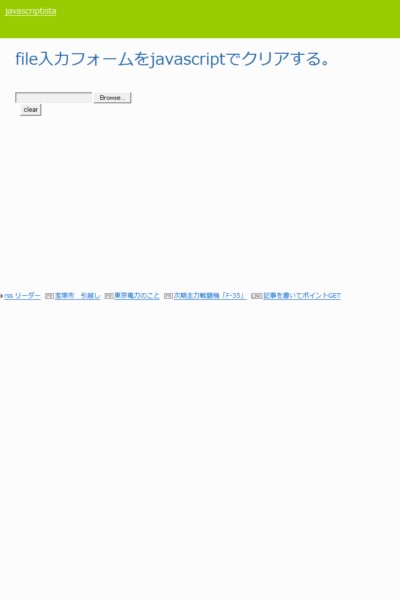
    <title>ファイル入力フォームをクリアする</title>
    <content mode="escaped" type="text/html" xml:lang="utf-8"> 
      <![CDATA[<p>ファイルアップロードはjavascriptから改変できない。セキュリティ上、ファイル場所を予測してアップさせることができると大変なので。そのための対策がブラウザによって違ってて、一回の命令では消えてくれないです。</p>
<a href="http://praiation.shiriagari.com/javascript_samples/0006/1-8/" target="_blank">
  DEMO
  <br />
  <img alt="" src="//javascript.go-th.net/File/96e87939.jpeg" class="demo" />
</a><br /><a href="http://javascript.go-th.net/javascript%20sample/%E3%83%95%E3%82%A1%E3%82%A4%E3%83%AB%E5%85%A5%E5%8A%9B%E3%83%95%E3%82%A9%E3%83%BC%E3%83%A0%E3%82%92%E3%82%AF%E3%83%AA%E3%82%A2%E3%81%99%E3%82%8B" target="_blank">つづきを読む</a>]]> 
    </content>
    <author>
            <name>No Name Ninja</name>
        </author>
  </entry>
  <entry>
    <id>javascript.go-th.net://entry/69</id>
    <link rel="alternate" type="text/html" href="http://javascript.go-th.net/javascript%20sample/canvas%E3%81%AEtransform%E3%82%84%E3%82%84%E3%81%93%E3%81%97%E3%81%84%E3%81%8C%E3%80%81%E3%81%84%E3%82%8D%E3%81%84" />
    <published>2013-03-13T01:28:59+09:00</published> 
    <updated>2013-03-13T01:28:59+09:00</updated> 
    <category term="Javascript Sample" label="Javascript Sample" />
    <title>Canvasのtransform。ややこしいが、いろいろ一度に指定できる。</title>
    <content mode="escaped" type="text/html" xml:lang="utf-8"> 
      <![CDATA[<p>transform(伸縮x, 傾斜y, 傾斜x, 伸縮y, 移動x, 移動y)となるようです。ややこしいですが、覚えると画像を楽しく変形させることができます。</p>
<a href="http://praiation.shiriagari.com/javascript_samples/0004/4-6/" target="_blank">
  DEMO
  <br />
  <img alt="" src="//javascript.go-th.net/File/9ad0ba80.jpeg" class="demo" />
</a><br /><a href="http://javascript.go-th.net/javascript%20sample/canvas%E3%81%AEtransform%E3%82%84%E3%82%84%E3%81%93%E3%81%97%E3%81%84%E3%81%8C%E3%80%81%E3%81%84%E3%82%8D%E3%81%84" target="_blank">つづきを読む</a>]]> 
    </content>
    <author>
            <name>No Name Ninja</name>
        </author>
  </entry>
  <entry>
    <id>javascript.go-th.net://entry/68</id>
    <link rel="alternate" type="text/html" href="http://javascript.go-th.net/javascript%20sample/%E7%94%BB%E5%83%8F%E3%82%84%E5%9B%B3%E5%BD%A2%E3%82%92%E3%81%8F%E3%82%8A%E6%8A%9C%E3%81%84%E3%81%A6%E6%8F%8F%E7%94%BB%E3%81%99%E3%82%8B%E3%80%82" />
    <published>2013-03-11T11:43:23+09:00</published> 
    <updated>2013-03-11T11:43:23+09:00</updated> 
    <category term="Javascript Sample" label="Javascript Sample" />
    <title>画像や図形をくり抜いて描画する。</title>
    <content mode="escaped" type="text/html" xml:lang="utf-8"> 
      <![CDATA[<p>Canvasで図形や画像をくり抜いて表示させることができます。</p>
<a href="http://praiation.shiriagari.com/javascript_samples/0004/4-1/" target="_blank">
  DEMO
  <br />
  <img alt="" src="//javascript.go-th.net/File/9ad0ba80.jpeg" class="demo" />
</a>
<br /><a href="http://javascript.go-th.net/javascript%20sample/%E7%94%BB%E5%83%8F%E3%82%84%E5%9B%B3%E5%BD%A2%E3%82%92%E3%81%8F%E3%82%8A%E6%8A%9C%E3%81%84%E3%81%A6%E6%8F%8F%E7%94%BB%E3%81%99%E3%82%8B%E3%80%82" target="_blank">つづきを読む</a>]]> 
    </content>
    <author>
            <name>No Name Ninja</name>
        </author>
  </entry>
  <entry>
    <id>javascript.go-th.net://entry/67</id>
    <link rel="alternate" type="text/html" href="http://javascript.go-th.net/%E3%80%90graphics%E3%80%91canvas/canvas%E3%81%A7%E7%94%BB%E5%83%8F%E3%82%84%E5%9B%B3%E3%81%AE%E7%B8%A6%E6%A8%AA%E5%B9%85%E3%82%92%E5%A4%89%E6%9B%B4%E3%81%97%E3%81%9F%E8%A1%A8%E7%A4%BA" />
    <published>2013-03-07T02:02:33+09:00</published> 
    <updated>2013-03-07T02:02:33+09:00</updated> 
    <category term="【Graphics】Canvas" label="【Graphics】Canvas" />
    <title>Canvasで画像や図の縦横幅を変更して表示</title>
    <content mode="escaped" type="text/html" xml:lang="utf-8"> 
      <![CDATA[<p>Canvasで図形や画像を伸縮させて表示させることができます。</p>
<a href="http://praiation.shiriagari.com/javascript_samples/0004/3-9/" target="_blank">
  DEMO
  <br />
  <img alt="" src="//javascript.go-th.net/File/9ad0ba80.jpeg" class="demo" />
</a>
<br /><a href="http://javascript.go-th.net/%E3%80%90graphics%E3%80%91canvas/canvas%E3%81%A7%E7%94%BB%E5%83%8F%E3%82%84%E5%9B%B3%E3%81%AE%E7%B8%A6%E6%A8%AA%E5%B9%85%E3%82%92%E5%A4%89%E6%9B%B4%E3%81%97%E3%81%9F%E8%A1%A8%E7%A4%BA" target="_blank">つづきを読む</a>]]> 
    </content>
    <author>
            <name>No Name Ninja</name>
        </author>
  </entry>
  <entry>
    <id>javascript.go-th.net://entry/66</id>
    <link rel="alternate" type="text/html" href="http://javascript.go-th.net/%E3%80%90graphics%E3%80%91canvas/canvas%E3%81%A7%E5%9B%9E%E8%BB%A2%E3%81%95%E3%81%9B%E3%81%A6%E8%A1%A8%E7%A4%BA" />
    <published>2013-03-05T02:03:25+09:00</published> 
    <updated>2013-03-05T02:03:25+09:00</updated> 
    <category term="【Graphics】Canvas" label="【Graphics】Canvas" />
    <title>Canvasで回転させて表示</title>
    <content mode="escaped" type="text/html" xml:lang="utf-8"> 
      <![CDATA[<p>Canvasで図形や画像を回転させて表示させることができます。</p>
<a href="http://praiation.shiriagari.com/javascript_samples/0004/3-8/" target="_blank">
  DEMO
  <br />
  <img alt="" src="//javascript.go-th.net/File/9ad0ba80.jpeg" class="demo" />
</a><br /><a href="http://javascript.go-th.net/%E3%80%90graphics%E3%80%91canvas/canvas%E3%81%A7%E5%9B%9E%E8%BB%A2%E3%81%95%E3%81%9B%E3%81%A6%E8%A1%A8%E7%A4%BA" target="_blank">つづきを読む</a>]]> 
    </content>
    <author>
            <name>No Name Ninja</name>
        </author>
  </entry>
  <entry>
    <id>javascript.go-th.net://entry/65</id>
    <link rel="alternate" type="text/html" href="http://javascript.go-th.net/javascript%20sample/canvas%E3%81%AE%E5%86%86%E5%BD%A2%E3%82%B0%E3%83%A9%E3%83%87%E3%83%BC%E3%82%B7%E3%83%A7%E3%83%B3" />
    <published>2013-03-04T02:39:10+09:00</published> 
    <updated>2013-03-04T02:39:10+09:00</updated> 
    <category term="Javascript Sample" label="Javascript Sample" />
    <title>Canvasの円形グラデーション</title>
    <content mode="escaped" type="text/html" xml:lang="utf-8"> 
      <![CDATA[<p>Canvasの円形グラデーションについて説明します。</p>
<a href="http://praiation.shiriagari.com/javascript_samples/0004/3-6/" target="_blank">
  DEMO
  <br />
  <img alt="" src="//javascript.go-th.net/File/9ad0ba80.jpeg" class="demo" />
</a><br /><a href="http://javascript.go-th.net/javascript%20sample/canvas%E3%81%AE%E5%86%86%E5%BD%A2%E3%82%B0%E3%83%A9%E3%83%87%E3%83%BC%E3%82%B7%E3%83%A7%E3%83%B3" target="_blank">つづきを読む</a>]]> 
    </content>
    <author>
            <name>No Name Ninja</name>
        </author>
  </entry>
  <entry>
    <id>javascript.go-th.net://entry/64</id>
    <link rel="alternate" type="text/html" href="http://javascript.go-th.net/%E3%80%90graphics%E3%80%91canvas/canvas%E3%81%AE%E7%B7%9A%E5%BD%A2%E3%82%B0%E3%83%A9%E3%83%87%E3%83%BC%E3%82%B7%E3%83%A7%E3%83%B3" />
    <published>2013-03-03T22:03:35+09:00</published> 
    <updated>2013-03-03T22:03:35+09:00</updated> 
    <category term="【Graphics】Canvas" label="【Graphics】Canvas" />
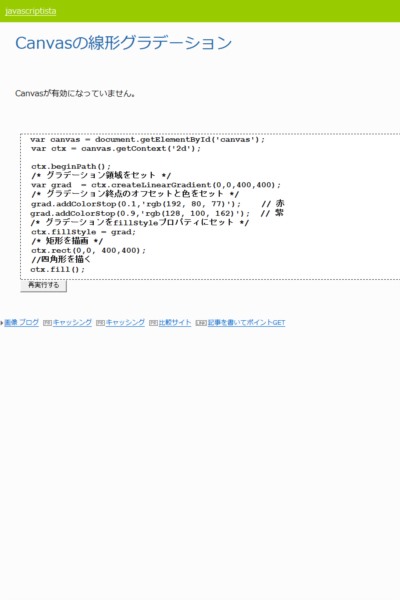
    <title>Canvasの線形グラデーション</title>
    <content mode="escaped" type="text/html" xml:lang="utf-8"> 
      <![CDATA[<p>Canvasの線形グラデーションについて説明しています。</p>
<a href="http://praiation.shiriagari.com/javascript_samples/0004/3-4/" target="_blank">
  DEMO
  <br />
  <img alt="" src="//javascript.go-th.net/File/9ad0ba80.jpeg" class="demo" />
</a><br /><a href="http://javascript.go-th.net/%E3%80%90graphics%E3%80%91canvas/canvas%E3%81%AE%E7%B7%9A%E5%BD%A2%E3%82%B0%E3%83%A9%E3%83%87%E3%83%BC%E3%82%B7%E3%83%A7%E3%83%B3" target="_blank">つづきを読む</a>]]> 
    </content>
    <author>
            <name>No Name Ninja</name>
        </author>
  </entry>
  <entry>
    <id>javascript.go-th.net://entry/63</id>
    <link rel="alternate" type="text/html" href="http://javascript.go-th.net/%E3%80%90graphics%E3%80%91canvas/canvas%E3%81%A7%E5%86%86%E3%81%8C%E6%8F%8F%E3%81%8F" />
    <published>2013-02-26T00:19:55+09:00</published> 
    <updated>2013-02-26T00:19:55+09:00</updated> 
    <category term="【Graphics】Canvas" label="【Graphics】Canvas" />
    <title>Canvasで円が描く</title>
    <content mode="escaped" type="text/html" xml:lang="utf-8"> 
      <![CDATA[<p>Canvasで円が書く方法です</p>
<a href="http://praiation.shiriagari.com/javascript_samples/0004/2-8/" target="_blank">
  DEMO
  <br />
  <img alt="" src="//javascript.go-th.net/File/f02cc028.jpeg" class="demo" />
</a><br /><a href="http://javascript.go-th.net/%E3%80%90graphics%E3%80%91canvas/canvas%E3%81%A7%E5%86%86%E3%81%8C%E6%8F%8F%E3%81%8F" target="_blank">つづきを読む</a>]]> 
    </content>
    <author>
            <name>No Name Ninja</name>
        </author>
  </entry>
  <entry>
    <id>javascript.go-th.net://entry/62</id>
    <link rel="alternate" type="text/html" href="http://javascript.go-th.net/javascript%20sample/window.onload%E3%82%92%E8%A4%87%E6%95%B0%E5%AE%9F%E8%A1%8C%E3%81%99%E3%82%8B%E3%81%9F%E3%82%81%E3%81%AE%E5%AF%BE%E5%BF%9C%E6%96%B9%E6%B3%95" />
    <published>2013-01-03T03:32:52+09:00</published> 
    <updated>2013-01-03T03:32:52+09:00</updated> 
    <category term="Javascript Sample" label="Javascript Sample" />
    <title>window.onloadを複数実行するための対応方法</title>
    <content mode="escaped" type="text/html" xml:lang="utf-8"> 
      <![CDATA[今や、ブログパーツなど、JSスクリプトで提供されているものなどをよく見かけますが、window.onloadを使用していると、ブログパーツに上書きされたり、ブログパーツ同士が上書きしあったりして動作しなくなることがあります。今回はこの回避方法について記述したいと思います。<br />
<br /><a href="http://javascript.go-th.net/javascript%20sample/window.onload%E3%82%92%E8%A4%87%E6%95%B0%E5%AE%9F%E8%A1%8C%E3%81%99%E3%82%8B%E3%81%9F%E3%82%81%E3%81%AE%E5%AF%BE%E5%BF%9C%E6%96%B9%E6%B3%95" target="_blank">つづきを読む</a>]]> 
    </content>
    <author>
            <name>No Name Ninja</name>
        </author>
  </entry>
</feed>